View Message Content Requirements
View Message Content Requirements controls what users must do before they can open and inspect the contents of a message. Each time a user views message content, SucuriLabs records the action in the audit log.
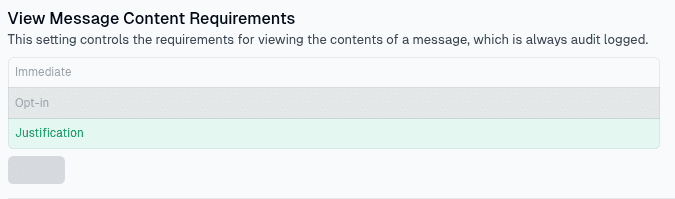
Requirement options
Choose the level of confirmation required before message content can be viewed:
| Option | What it means |
|---|---|
Immediate | Users can view message content without any additional confirmation |
Opt-in | Users must confirm that they want to view the message content before it opens |
Justification | Users must provide a reason before they can view the message content |
Using a stricter option adds more accountability when sensitive message content is accessed. The selected requirement applies whenever users view message details such as the message body, links, attachments, screenshots, or related insights.
Saving changes
Select the requirement that matches your organization’s access policy, then select Save to apply the setting.
Last updated on