Settings
Manage your account, workspace, and email protection settings.
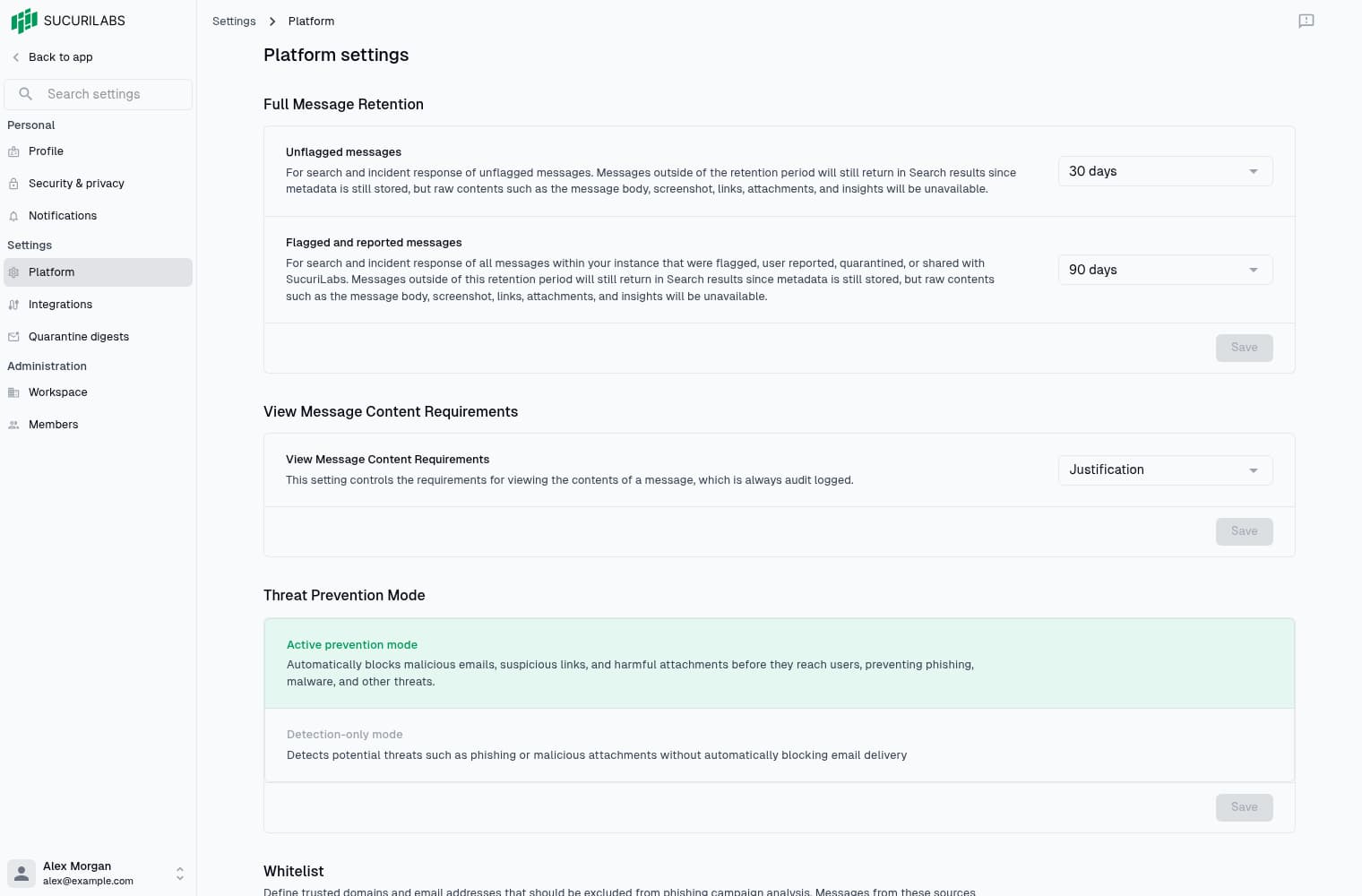
Find the right settings
Open Settings in the application navigation, then search the sidebar for a page. Available pages depend on your permissions. Read access does not grant editing access.
| Area | Page | What it controls |
|---|---|---|
| Personal | Profile | Name, login email, avatar, and language |
| Personal | Security & privacy | Password, cookies, and profile export |
| Personal | Notifications | Communications from SucuriLabs |
| Settings | Platform | Retention, content access, protection, and trusted senders |
| Settings | Integrations | Connections such as Microsoft 365 |
| Settings | Quarantine digests | Daily digest policies for eligible mailboxes |
| Administration | Workspace | Organization details and usage-data sharing |
| Administration | Members | Workspace invitations, roles, and member access |
Platform controls
- Full Message Retention: choose how long flagged and unflagged message content is kept.
- Message Content Access: require immediate access, an explicit opt-in, or a justification before viewing content.
- Threat Prevention Mode: choose active prevention or detection-only behavior.
- Whitelist: maintain trusted domains and senders.
Each Platform section saves independently. Select Save in the section you’ve changed, or Back to app in the sidebar to return to your investigation.
Last updated on